Redesign Your Room by Describing It
Tell the assistant what you want. It looks at your photo first, works out the room, the materials and the light, then writes the prompt for you.
What Is AI Design Chat?
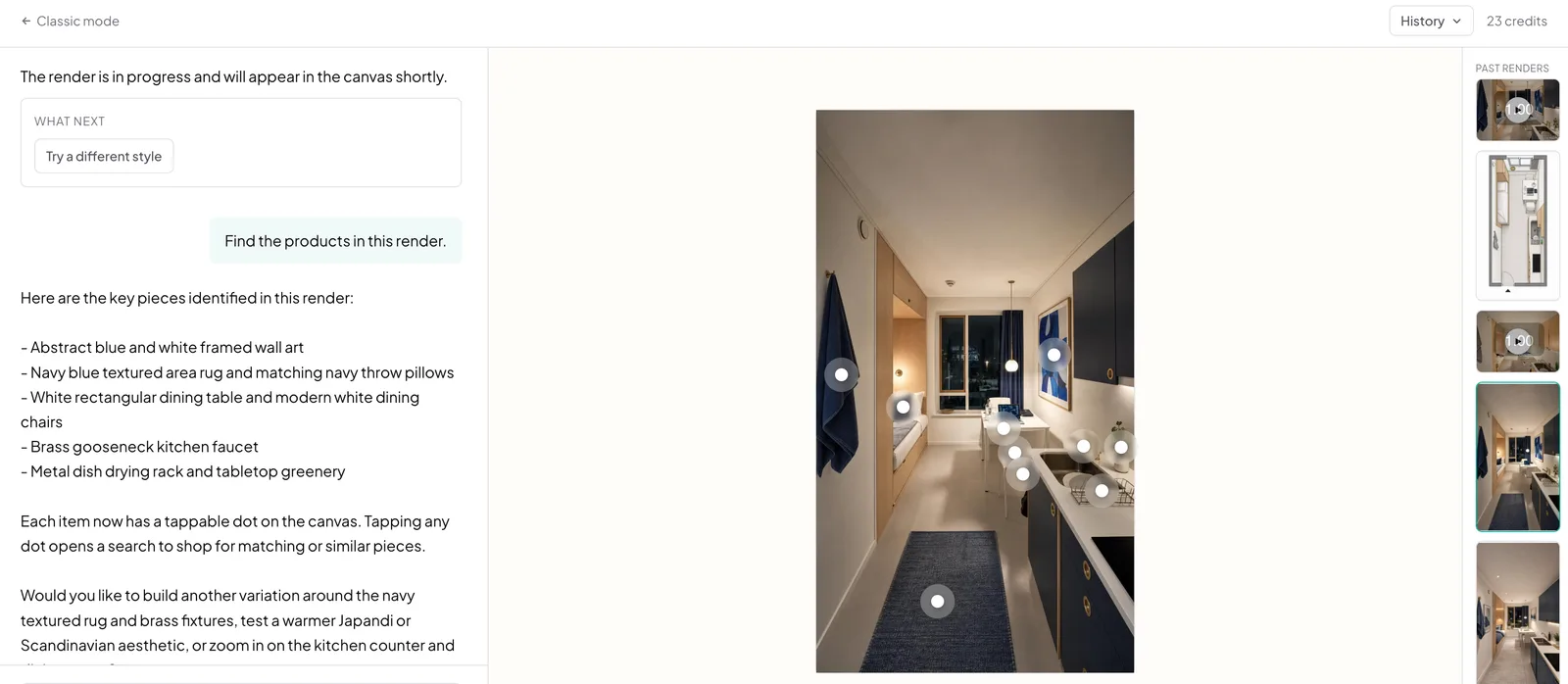
AI Design Chat is a second way to use Archmaster: instead of picking a feature and a style from a form, you upload a photo and describe what you want in your own words.
- The assistant reads your photo first, identifying room type, style, materials, and light
- Names your actual cabinetry and windows in the prompt, not a generic style label
- Handles the whole conversation, each follow-up builds on the last instead of starting over
- Each message costs 1 credit, renders cost the same as the classic workspace
How designing by chat works, step by step
The assistant looks at your photo before it writes anything, so the prompt it builds names your actual cabinetry and your actual light.
Upload a photo
Drop in any room, facade or garden photo. JPG, PNG or WebP up to 12 MB. This is the only thing the assistant needs before it can start.
- JPG, PNG, or WebP up to 12 MB
- The only thing the assistant needs before it starts
Say what you want
Plain language is enough. The assistant reads the photo, tells you what it found, and turns your sentence into a prompt that names the real materials and lighting in your space.
- Reads the room type, materials, and light before writing a prompt
- Names your actual cabinetry and windows, not a generic label
Keep going from there
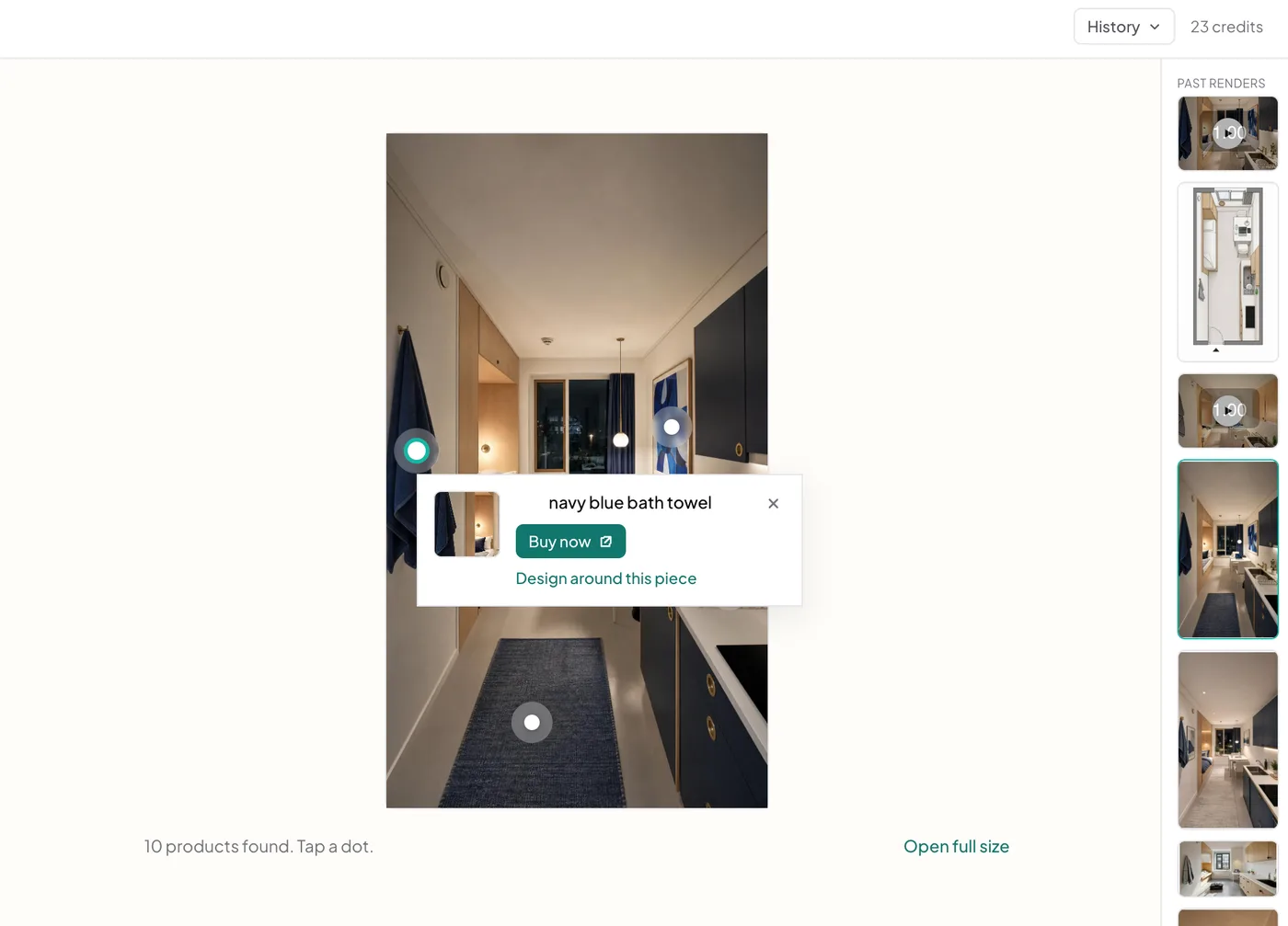
Ask for a different style, another angle, a video, or the products in the render. Every follow-up keeps the context of the photo and everything already said about it, so you never re-explain the room and never paste the same description twice.
- Ask for a different style, another angle, or a video
- Every follow-up keeps the context of the conversation
The problem
The prompt is the part most people get wrong
Image models reward prompts that name materials, light, and framing in the language the model was trained on. Most people write a sentence about what they want, get something generic back, and conclude the tool does not work. The gap is not taste, it is vocabulary.
- A short prompt returns a generic room, not your room
- Learning what a model responds to is a skill nobody asked to acquire
- Form fields cover the common cases and nothing outside them
- Every re-roll costs a credit, so guessing is expensive
What this does
Say it plainly, let the assistant write the prompt
Upload a photo and describe what you want in ordinary words. The assistant reads the photo first, tells you what it found, and turns your sentence into a prompt that names the real materials and lighting in your space, then runs it.
- Reads the room type, materials, and light from the photo before writing anything
- Names your actual cabinetry and windows instead of a generic label
- Follow-ups keep the context, so you never re-describe the room
- 1 credit per message, plus the cost of what it generates
100,000+
Rooms redesigned
5,000+
Happy users
No data storage
Photos are processed and deleted — never kept or sold.

Secure payments
Checkout handled entirely by Stripe.
What people do with it
I tried four styles on my living room before picking one. Seeing the actual result before spending a dollar on furniture saved me from a mistake.

Sarah Chen
Homeowner
Staged three vacant listings in one afternoon. What used to take a week and a rental invoice now takes minutes per room.

Marcus Webb
Real estate agent
I use it to show clients three directions in the first meeting instead of describing them. They sign off faster because they're looking at their actual room.

Priya Patel
Interior designer
Turned a rough kitchen sketch into something I could actually show a contractor. Cut a week off getting quotes.

Tom Reyes
Homeowner
Tested a paint color and new furniture layout before asking my landlord about anything. No surprises, no wasted money.

Elena Novak
Renter
Also in Archmaster


Read next
30 AI Interior Design Prompts That Actually Work (2026)
Get 30 copy-paste AI interior design prompts organized by room, built on a style plus materials plus lighting plus mood formula for consistent results.
How to Use AI to Decorate a Room: Beginner Guide for 2026
A complete beginner walkthrough for using AI to decorate a room, from your first photo upload to swapping items, backed by 2026 accuracy data.
ChatGPT Interior Design: What It Can (and Can't) Do
ChatGPT can plan colors, furniture, and layout through text but can't render your actual room. Here's how designers really use it, backed by 2026 data.
FAQ
How is this different from the normal workspace?
The classic workspace sends your text straight to the image model with a fixed template. Chat analyses the photo first and writes the prompt around what is actually in the room, which is usually the difference between a render of your space and a render of a generic one.
Do I have to re-upload my photo for every request?
No. The conversation remembers the photo it is working on, so a follow-up like 'now try it Mediterranean' needs nothing but the sentence.
What does it cost?
Each message costs 1 credit. Any render the assistant makes costs the same as in the classic workspace: 1 credit for a redesign, 3 for an alternate angle, 5 for a video.
Can it do everything the classic workspace does?
Yes. Interior and exterior redesign, sketch to image, upscaling, targeted edits, alternate angles, video, virtual staging, room planning, landscape design and floor plans are all available through the conversation.
Can I go back to the classic workspace?
Any time. The two share the same account, the same credits and the same render library, and switching is one click in either direction.
Stop filling in forms. Just say it.
Upload one photo, describe the room you want, and let the assistant do the part that decides whether the render looks like your home or somebody else's.
Start designing