Virtual Home Staging: Furnish Any Empty Room with AI
Upload a photo of an empty or vacant property, choose a furniture style, and get a photorealistic staged render in seconds — built for listings, not for hiring a stager.

What Is Virtual Home Staging?
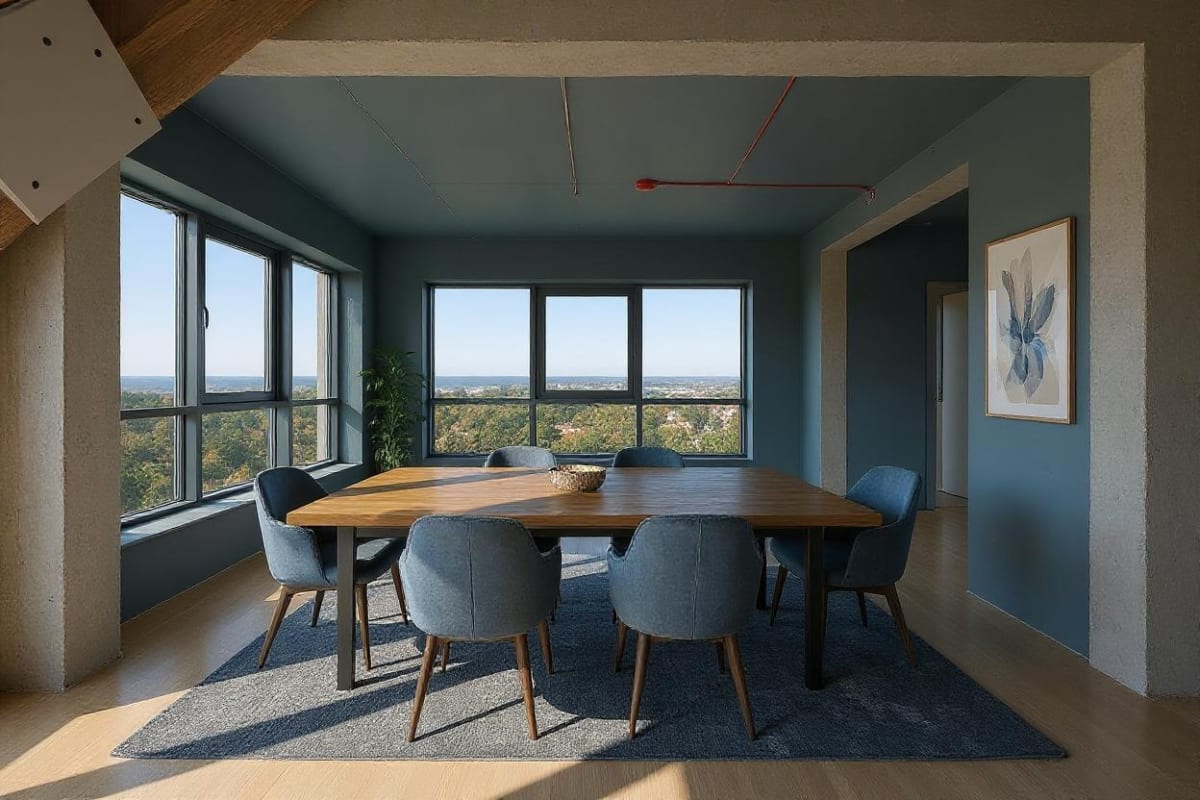
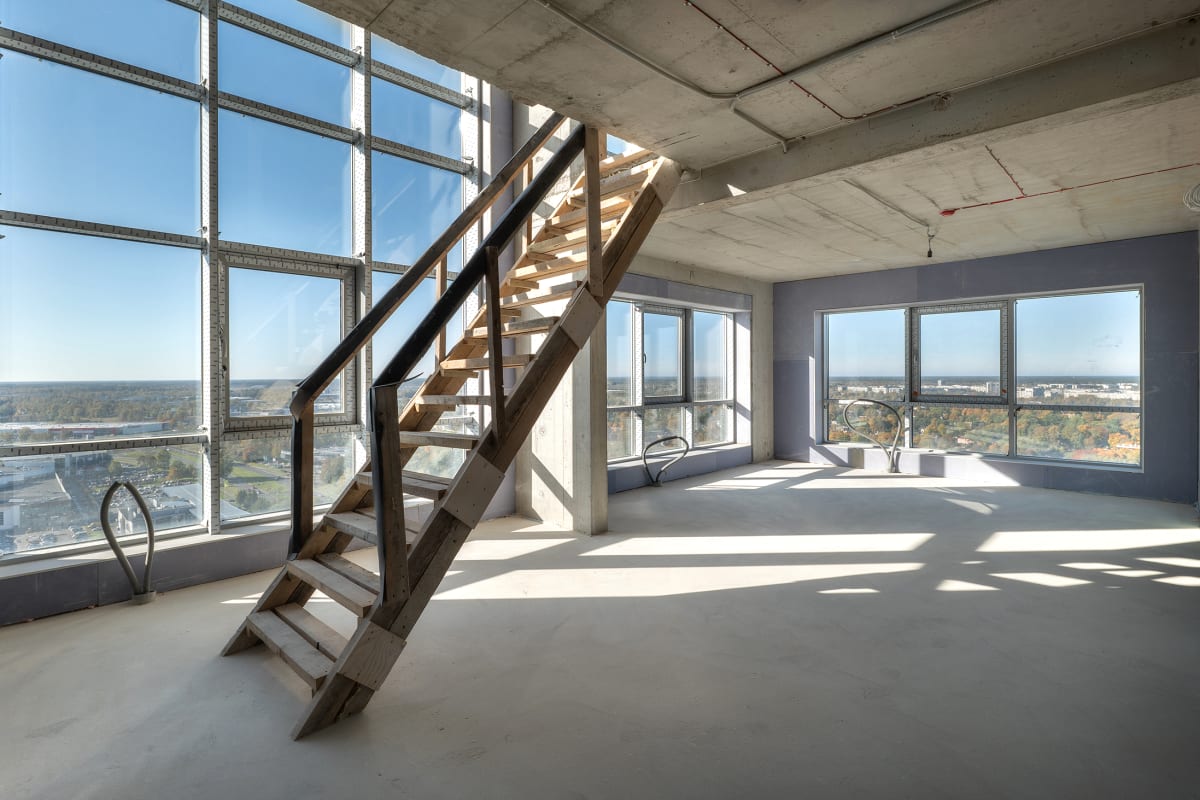
Virtual home staging furnishes an empty or vacant property in photos, without moving any real furniture. Upload a photo of an empty room, pick a furniture style, and the AI adds photorealistic furniture, decor, and lighting sized to fit the room.
- Real estate agents get listing-ready photos in minutes instead of paying for physical staging
- Furniture is placed at a scale that matches the actual space
- Costs 1 credit per staged photo, far cheaper than a single physical staging booking
How virtual staging works, step by step
An empty room photo goes in, a furnished version of the same room comes back, at the same framing, in minutes rather than days.
Upload the empty room
Drag and drop a photo of the vacant space. JPG, PNG, or WebP up to 12 MB. Works with phone photos straight from a listing walkthrough.
- JPG, PNG, or WebP up to 12 MB
- Works with phone photos from a listing walkthrough
Pick a furnishing style
Choose from 20 style presets — Modern, Scandinavian, Coastal, Luxury and more — to match your target buyer.
- 20 style presets to match your target buyer
- Modern, Scandinavian, Coastal, Luxury and more
Put it straight on the listing
The staged photo comes back at the framing you shot, so it drops into the same slot in the gallery as the empty version. Use it on the portal listing, in a brochure, or in a paid social ad. Most portals require virtually staged images to be labeled as such, so disclose it in the caption.
- Ready in seconds
- Use on the listing or in marketing
The problem
Empty rooms photograph badly, and physical staging is slow and expensive
A vacant room in a listing photo reads as smaller and colder than it is, and buyers scrolling a portal give it about a second. The traditional fix is a stager, a van, a rental contract, and a week of lead time, for a property that may be under offer before the invoice clears.
- Physical staging runs into the thousands per property, plus monthly rental
- Booking a stager adds days or weeks before the listing can go live
- Buyers judge a listing from the first two photos, and an empty room loses that judgment
- A property that sells quickly still pays the full staging bill
What this does
Furnish the photo instead of the property
Upload the photo you already took on the walkthrough and pick a furnishing style that suits the buyer you are targeting. The room comes back furnished, at the same framing and the same perspective, with the windows, flooring, and proportions of the real property intact.
- Works from phone photos taken during a normal listing walkthrough
- 20 furnishing presets, from Scandinavian and Coastal to Luxury and Airbnb
- Stage several rooms in one sitting, with no van, no rental, and no lead time
- 1 credit per render, 30 credits a week on the $9.99 plan

100,000+
Rooms redesigned
5,000+
Happy users
No data storage
Photos are processed and deleted — never kept or sold.

Secure payments
Checkout handled entirely by Stripe.
What people do with it
I tried four styles on my living room before picking one. Seeing the actual result before spending a dollar on furniture saved me from a mistake.

Sarah Chen
Homeowner
Staged three vacant listings in one afternoon. What used to take a week and a rental invoice now takes minutes per room.

Marcus Webb
Real estate agent
I use it to show clients three directions in the first meeting instead of describing them. They sign off faster because they're looking at their actual room.

Priya Patel
Interior designer
Turned a rough kitchen sketch into something I could actually show a contractor. Cut a week off getting quotes.

Tom Reyes
Homeowner
Tested a paint color and new furniture layout before asking my landlord about anything. No surprises, no wasted money.

Elena Novak
Renter


Questions about this
- Can AI design a room from a photo?
Yes. Upload one photo and an AI design tool returns that same room restyled, keeping your walls, windows and camera angle while changing finishes, furniture and lighting. It produces a visual concept in seconds, not a measured plan or a buildable specification.
Free tools for this project
Read next
Best AI Virtual Staging Software in 2026, Tested and Ranked
Six AI virtual staging tools compared on price, turnaround and what each one publishes about realism. Costs run $0.30-$32 per photo versus $2,000-$6,000 for physical staging.
AI Virtual Staging: Furnish Empty Listings in Minutes
AI virtual staging furnishes empty rooms for $1-$15 a photo instead of $2,000-$6,000 for physical staging, with results ready in under a minute.
Do Virtually Staged Homes Sell Faster? The Data Explained
Virtually staged homes sell 73% faster and list up to 15% higher than vacant ones. Here's what the real estate data shows about staging ROI.
AI Kitchen Virtual Staging: Before-and-After Listing Results
The kitchen sways roughly 80% of home buyers. See how AI kitchen virtual staging turns a dated photo into a listing-ready before-and-after for $1–$15.
AI Architecture Tools for Real Estate Developers (2026)
AI visualization cuts rendering costs by up to 80% and helps developers close pre-construction sales faster. See the exact workflow top developers use.
AI Interior Design for Real Estate Agents: Full Workflow
Cut listing prep time by 80% and staging costs by 95-99% versus physical staging. See the exact AI interior design workflow real estate agents use.
FAQ
Is virtual staging the same as interior design?
Not quite — virtual staging furnishes an empty property to help it sell, while interior redesign restyles a room that's already lived in. Archmaster's underlying AI render engine handles both; this page is tuned for the empty-property use case.
Can I use virtual staging photos in real estate listings?
Yes. Most MLS and listing platforms allow virtually staged photos as long as they're clearly disclosed as virtually staged — check your local listing rules.
How long does virtual staging take?
Seconds per photo, not days. Upload the empty room, pick a style, and download the result — no need to schedule a stager or move furniture.
Will the furniture look the right size for the room?
Yes. The AI reads the room's proportions from the photo itself and scales furniture to fit, so results avoid the oversized-couch look that's common with generic AI image tools.
Turn vacant listings into sold listings.
No stager to book, no furniture to rent. Stage a property in the time it takes to upload a photo.
Start designing